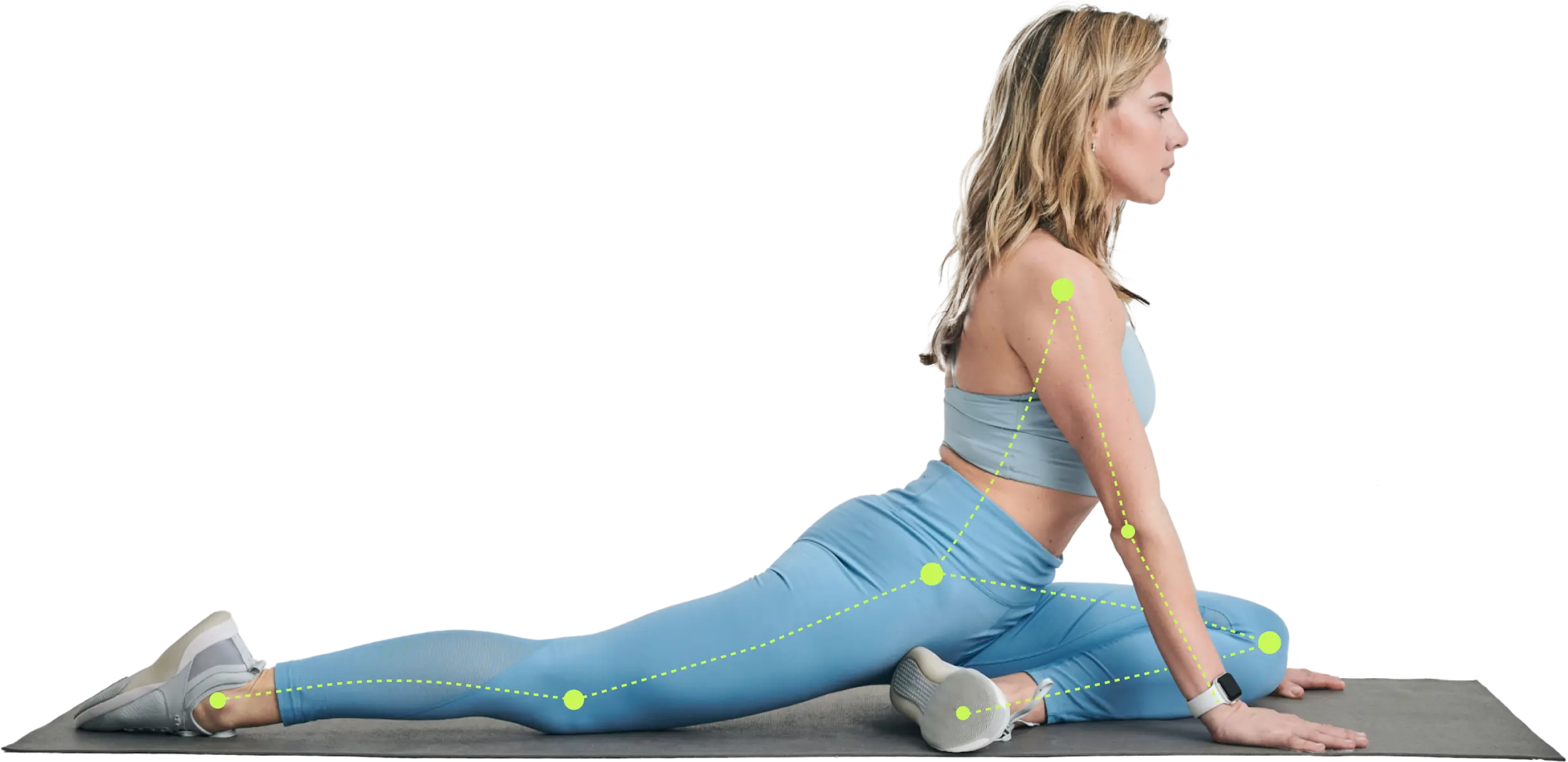
Ready to build muscle? Our 2026 guide explains how to choose the right strength training app, from AI features to safety. Find the perfect fit for your goals.
You've probably done some version of this already. You decide it's time to get stronger, open the app store, search for a strength training app, and immediately hit a wall. One app looks like a digital notebook. Another promises AI coaching. Another has glossy videos but no clue what to do when you're sore, short on time, or training at home with two dumbbells and a chair.
That confusion makes sense.
Modern strength apps don't all do the same job. Some are built to record workouts. Some are built to recommend them. A smaller group tries to adapt training based on your performance, recovery, equipment, and movement quality. If you don't know the difference, it's easy to choose an app with a high rating and still end up with a plan that doesn't fit your body or your life.
The good news is that your phone can now do far more than play follow-along videos. It can help organize your training, spot patterns, guide exercise selection, and in some cases even use the camera to watch how you move. The useful question isn't “Which app is most popular?” It's “Which app understands what I need today, and can adjust when that changes?”
Why Your Phone Might Be the Best Personal Trainer
A lot of people don't avoid strength training because they dislike it. They avoid it because they don't know where to start. They're unsure how many days to train, which exercises are safe, whether they should lift heavier, or what to do when they miss a session.
That's where a modern strength training app can help. It gives you structure on the days when motivation is low and removes guesswork on the days when energy is high. Instead of staring at a rack of dumbbells and hoping for the best, you open your phone and get a plan.
This shift didn't happen by accident. The broader fitness app market became a large global category, with about 18.7 million downloads in January 2019, rising to more than 26.3 million in January 2021, and settling at approximately 25.15 million in January 2025, according to Statista's health and fitness app market overview. That pattern matters because it shows people kept using digital fitness tools even after the home-workout surge cooled.
What your phone does better than a paper plan
A paper workout plan is fixed. Your life isn't.
Your phone can keep track of what you did last time, how long it took, what equipment you have, and whether you're progressing. That means it can do a job that's closer to a coach than a checklist.
A good app can help with things many beginners struggle with:
- Consistency: It tells you what to do today instead of making you decide from scratch.
- Progression: It shows when an exercise is getting easier and when it's time to change load, reps, or difficulty.
- Clarity: It gives demos, cues, and instructions in the moment.
- Flexibility: It can shift between home and gym sessions based on what you have available.
Practical rule: If an app only stores your workouts but never changes your plan, you're using a tracker, not a coach.
Why this matters for real people
The best personal trainer isn't always the one with the loudest voice or the fanciest gym floor. For many people, it's the tool they'll use three or four times a week without friction.
That's why your phone can become such a useful training partner. It's already with you. It can remind you, guide you, and record what happened. And if the app is designed well, it doesn't just tell you to work harder. It helps you work smarter and more safely.
From Digital Logbooks to Intelligent Training Partners
The first generation of strength apps worked like a better notebook. You opened the app, entered your sets and reps, maybe added a custom exercise, and looked at a chart later. That was useful, especially compared with loose scraps of paper or trying to remember what you benched last Tuesday.
Early leaders helped define that baseline. Strong says it's trusted by more than 3 million people and includes features like custom exercises, advanced charts, Apple Health integration, warm-up calculators, CSV export, and more, as described on the Strong app website.

The old model versus the new one
Think of the difference like this:
| Type | What it does | Where it helps | Where it falls short |
|---|---|---|---|
| Basic tracker | Records lifts after you do them | Logging and reviewing past sessions | Doesn't guide next steps well |
| Intelligent app | Uses your data to shape future sessions | Planning, progression, adaptation | Quality depends on how smart the system really is |
A digital logbook is like a paper map. It shows where you've been.
An intelligent training app is closer to GPS. It doesn't just display the route. It checks conditions and can reroute based on what's happening now.
That matters in strength training because progress isn't just about recording numbers. It depends on applying the right stress at the right time. If you're learning about progression, this guide to progressive resistance training gives helpful background on why training needs to evolve instead of staying static.
What became standard
As the category matured, users started expecting more than set-and-rep entry. Apps like Hevy and StrengthLog pushed the experience toward fuller ecosystems with exercise libraries, personal records, progress views, and training stats. The category moved from “log what happened” to “support how I train.”
That raised the bar for everyone.
Now, when someone says a strength training app is “good,” that can mean very different things. It might be excellent for detailed logging. It might have a strong community. Or it might be advanced enough to guide recovery, programming, and exercise choice. Those are different products with different philosophies.
A polished interface isn't the same thing as smart coaching. The key question is whether the app responds to your training history or just displays it neatly.
Why this shift matters
Once you understand that history, app shopping gets easier. You stop comparing brands only by design or star rating and start asking better questions.
Does this app just collect information? Or does it use that information to make tomorrow's workout better than today's?
That's the line between a tool you open occasionally and one that can support long-term strength progress.
Decoding the Tech Behind a Smarter Workout
You finish a hard session on Monday, open your app on Tuesday, and see a plan that shifts with you instead of repeating the same workout on autopilot. That moment tells you more about an app than its rating in the app store. A smart strength training app should act less like a digital notebook and more like a coach who remembers what happened last time.
The phrase “AI fitness” can make this sound more complicated than it is. In practice, the useful part is simple. The app collects signals, looks for patterns, and adjusts training based on what those signals suggest.

AI personalization
Many apps begin with an intake quiz. You enter your goal, experience level, equipment, available time, and training setting. The app uses that information to build a starting point.
That is personalization, but only at the front door.
An app shows its intelligence after a few workouts. Does it notice that you consistently finish upper-body sessions easily but stall on lower-body volume? Does it respond when you skip a day, swap dumbbells for machines, or report unusual soreness? Fitbod explains this kind of pattern-based adjustment in its overview of the best way to track workouts.
A good comparison is a GPS app. Entering your destination is useful, but the tool becomes much more helpful when it reroutes around traffic. Training apps work the same way. The first plan matters less than the quality of the updates.
Adaptive training
This is the point many readers mix up, so separate the two ideas clearly.
A personalized app gives you a plan that fits your profile at the start. An adaptive app keeps editing that plan as real life happens.
That difference matters in the gym. If your sleep was poor, your shoulder feels irritated, or your lunch break shrank from 45 minutes to 20, your training should change too. A static program treats every session like a preprinted worksheet. An adaptive system works more like a coach with a pencil, making adjustments in the margin based on how you are doing.
Recovery data fits here. Strength gains come from training stress plus enough recovery to absorb it. If you want more context on how sleep timing can influence performance, these circadian rhythm sleep tips are a useful companion.
Computer vision and form feedback
Some of the biggest changes in this category come from the phone camera.
Computer vision means the app estimates where your joints are and how your body is moving. That can support rep counting, range-of-motion checks, pace tracking, and simple form prompts during an exercise. For a new or intermediate lifter, that matters because the biggest form mistakes are often basic ones. Cutting squat depth short, rushing reps, or losing position under fatigue are common problems that a camera can sometimes catch faster than the lifter can feel them.
As noted earlier in this article, recent clinical research suggests phone-based pose estimation can support meaningful training improvements and more individualized guidance. The important takeaway is not that every camera app is equally good. It is that form feedback is now a real category to evaluate, not a novelty feature to ignore.
Better metrics without turning training into homework
More data is not always better. Useful data should answer a coaching question.
These are the metrics that usually matter most:
- Workout history: what you trained, how much you lifted, and how the session felt
- Performance trends: whether reps, load, or consistency are improving over time
- Recovery inputs: soreness, readiness, sleep, or connected health signals
- Body context: body composition or progress markers when the app supports them
The pattern to look for is a feedback loop. You train, the app records what happened, it updates your next recommendation, and the cycle repeats. That is the core idea behind many AI-powered workout app systems, which combine workout history, health inputs, and exercise feedback into one decision process.
Coach's view: Good training tech stays in the background. You should notice better exercise choices, better timing, and better load selection. You should not feel like you need to study a dashboard between sets.
One example of this approach is Zing Coach, which uses an intake quiz, health-data integration, body-composition inputs, fitness testing, and computer-vision feedback to tailor sessions around goals, equipment, duration, and fatigue.
Finding Your Fit Which App Persona Are You
You open an app at 6:10 a.m., half awake, and ask a simple question. What should I do today that is safe, useful, and realistic?
The right answer depends less on app store ratings and more on your training persona. A strength app is part coach, part logbook, and part decision system. If you know what kind of help you need, you can judge the tech by the job it needs to do.
That is the filter.
The nervous beginner
A beginner usually does not need more exercise options. They need fewer wrong turns.
If you are unsure how to brace, how hard to push, or whether an exercise feels correct, the best app is one that teaches in a clear order. First, it shows the movement. Then, it explains the key cues. After that, it gives you a manageable next step. Good beginner design works like training wheels on a bike. It reduces wobble so you can build confidence without guessing.
For this persona, look for plain-language coaching, short demos, simple progressions, and some kind of form support. As noted earlier, camera-based feedback and guided coaching can lower the barrier to getting started and help solo trainees make safer decisions.
The busy professional
This user is not short on ambition. They are short on uninterrupted time.
A good app for a packed schedule should behave like a smart assistant. If your meeting runs late, it should swap in a shorter session. If you are stuck at home, it should shift from barbell work to dumbbells or bodyweight without making you rebuild the whole week. The question is not whether the app has a huge library. The question is whether it can make a good call when real life interferes.
That kind of flexibility matters more than extra features you will never open.
On a chaotic week, the best program is the one that still gives you a productive session instead of asking you to start over.
The data-driven lifter
Some lifters stay motivated by feel. Others want receipts.
If you like trends, comparisons, and proof that training is working, choose an app that turns records into decisions. A graph by itself is only a scoreboard. Coaching value comes from what the app does next. Does it suggest a load increase after repeated success? Does it hold you steady when performance drops? Does it help you spot whether the issue is effort, recovery, or inconsistency?
For this persona, useful data should answer coaching questions, not just decorate the screen.
The returner with limitations
Coming back after pain, injury, time off, or a long break in confidence changes what "good programming" means.
You may need slower progressions, more substitutions, and clearer permission to scale. A rigid app can make this worse by acting as if missed workouts never happened. A better one adjusts your next session to your current capacity. It works like a coach who notices you are limping into the gym and changes the plan before the first set.
If your goal is rebuilding strength with a muscle-gain focus, this guide to best workout apps for muscle gain shows what to look for beyond aggressive marketing claims. If cardio support or lower-impact training matters too, you can also start your BionicGym journey.
A quick self-check
Choose the sentence that sounds most like your current situation:
- I need clear guidance so I can start safely
- I need workouts that fit around an unpredictable schedule
- I want training feedback I can measure over time
- I need a plan that respects limits and helps me rebuild
That answer gives you a better buying lens than star ratings alone. It helps you judge whether an app is built for your real training problem, not just for broad appeal.
Your 7-Point Checklist for Choosing the Right App
Once you know what modern apps can do, the next step is testing them like a coach would. Don't ask whether the app looks impressive. Ask whether it makes good training decisions.
The most useful difference in today's market is the shift from static workout libraries to systems that adjust for fatigue, recovery, and performance feedback. Peak Strength describes this broader direction toward training that changes with the user in its explanation of how workouts alter to fit the user's needs.

The checklist
Does it adapt, or does it just assign?
A lot of apps build a plan on day one. Fewer adjust it well on day ten. Miss a session, report soreness, or change equipment and see what happens. If nothing changes, the “personalization” may be shallow.Can it coach a beginner clearly?
Open a workout and inspect the experience. Are instructions plain? Are demos easy to follow? Could someone with zero lifting background use it without feeling lost?Does it offer form support?
Form feedback can come from video demos, cues, pace guidance, or camera-based analysis. This matters most for people training alone. Good support lowers friction and can improve confidence.Does it fit your environment?
Some people train at home during the week and in a gym on weekends. The app should handle that without making you rebuild the program manually.Is progress easy to understand?
You should be able to answer basic questions fast: Am I stronger? More consistent? Recovering well? If the tracking is messy, people stop using it.Is the time demand realistic?
A good app works in your actual life, not your ideal life. If every session assumes a long window and perfect energy, adherence usually falls apart.Is the pricing model worth the job it does?
Some apps are simple tools with simple pricing. Others function more like a digital coach. Use the trial period well. Try onboarding, a few workouts, a missed day, and a schedule change before deciding.
A quick test during the free trial
Use this small stress test during a trial week:
- Change one variable: shorten a workout window or remove equipment
- Report honest feedback: soreness, low energy, or difficulty
- Review the next workout: see if the app responds intelligently
- Check the interface: make sure logging and instructions feel easy
If you're exploring connected training tools beyond conventional strength apps, BionicGym offers a practical onboarding resource for people who want to start your BionicGym journey and understand how app-guided exercise systems are introduced.
What good value looks like
The right app doesn't need every feature. It needs the right features for your situation.
If you want a framework for evaluating apps that build around your own constraints, a personalized workout plan app should be able to adjust for goals, recovery, schedule, and equipment without making you micromanage the process.
A Week with an AI Trainer A Sample Workflow
Abstract features make more sense when you see them in a normal week. So let's follow Alex, a fairly typical user. Alex wants to get stronger, trains inconsistently, and has access to a gym some days and only home equipment on others.

Day 1 to Day 2
On the first day, Alex answers a setup quiz. The app asks about goals, experience, available equipment, workout length, and any physical limitations. It may also use a short fitness test or movement screen.
The next day, Alex gets a first workout that matches those answers. Instead of a random full-body routine from the internet, it feels scaled to where Alex is right now. Exercise demos reduce uncertainty, and the app records how the session went.
Day 3 to Day 5
By Day 3, soreness shows up. Alex reports that recovery is decent overall but legs are tired. A static app would ignore that. An adaptive one shifts emphasis, lowers volume, or changes the target muscle groups.
Then real life interrupts. On Day 5, Alex only has a short window. Rather than skipping the day, the app offers a shorter session that still fits the broader plan. That's one of the biggest practical wins in this category. The system protects consistency even when the week isn't ideal.
Some of the smartest coaching an app can do is not pushing harder. It's reducing friction so you can keep showing up.
Day 6 to Day 7
At the end of the week, Alex reviews progress. Not just weight lifted, but also completed sessions, effort, and how the body felt across the week. This helps separate “I'm failing” from “I'm adapting.”
The app may suggest recovery work, light activity, or a rest day before the next training block starts. That's useful because many people only think an app is helping when it prescribes hard sessions. In reality, good coaching also knows when not to add more.
If you want to judge whether an app gives meaningful feedback at this stage, learn how to track fitness progress beyond just checking whether you feel tired after a workout.
Frequently Asked Questions About Strength Apps
Can a strength training app replace a human trainer
Sometimes, yes. Sometimes, no.
For many beginners and intermediate users, an app can handle programming, guidance, logging, and routine-building very well. It's especially helpful when the main problem is consistency or confusion. But a skilled in-person coach is still better for nuanced movement assessment, complex injury history, and highly individualized technical coaching.
Can I use one at home without a gym membership
Usually, yes. Many apps let you select available equipment and build around that. The key is whether the app can shift between bodyweight, dumbbells, machines, or mixed environments without breaking the plan.
Are these apps safe for complete beginners or people with past injuries
They can be, but safety depends on the design. Look for clear demos, progressive difficulty, exercise substitutions, and feedback features that reduce guesswork. Recovery guidance matters too. If you're trying to improve how you bounce back between sessions, MEDISTIK shares practical recovery strategies after workouts that pair well with a more adaptive training plan.
The main thing to remember is this: don't choose a strength training app because it has the most exercises. Choose one that helps you do the right exercises, at the right difficulty, on the right day.
If you want an app that builds workouts around your goals, equipment, schedule, and recovery while also offering form feedback and progress tracking, Zing Coach is worth a look. It's designed for people who want more than a workout library and need training that can adjust as real life changes.
Share this article


Authors